 Japanese
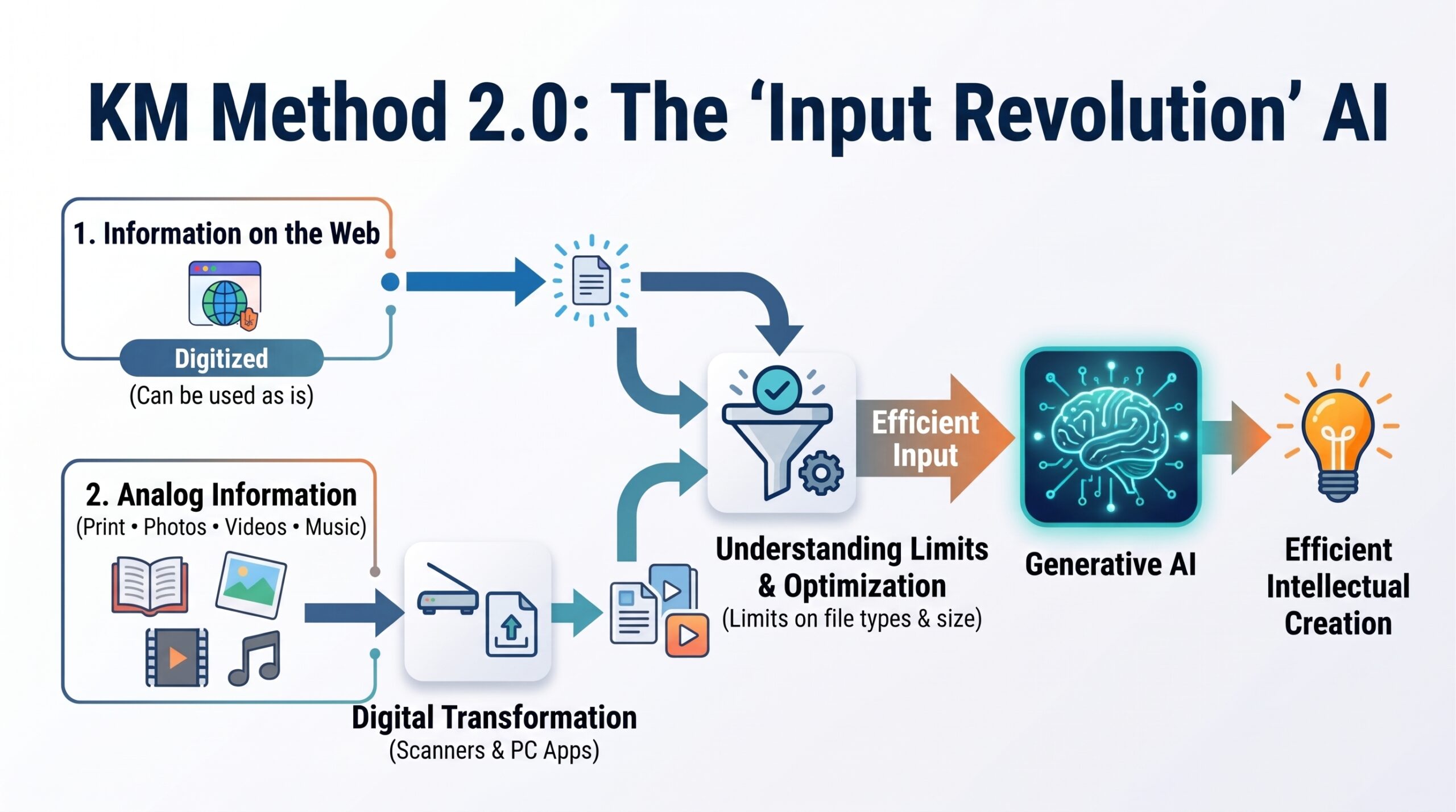
Generative AI can only accept data—whether gathered from across the web or imported externally via a PC—in a digitized format. Web-based sources present no issue since they are natively digital; however, printed materials, photographs, analog video recordings, and audio files must first be converted into digital formats using scanners, dedicated software, or PC applications before they can be ingested. Furthermore, even when digitized, generative AI models impose specific limitations on supported file formats and maximum upload sizes. Accurately understanding these constraints and ensuring efficient data input is the prerequisite for enabling highly productive intellectual creation with generative AI. This is precisely what KM Method 2.0 defines as the “Input Revolution.”
Table of Contents
- 9-1: Characteristics of Generative AI as a Knowledge Source
- Vast Knowledge Base
- Rapid Response Times
- Multimodal Capabilities
- Natural Language Interaction with Generative AI
- Cross-Verification Using Identical Prompts
- Recursion of Inputs and Outputs
- Automated Prompt Generation by AI
- Reduced Cognitive Bias
- Dependence on Digital Information
- Expanding and Giving Shape to Ideas and Concepts
- 9-2: The Battle Over Text File Formats
- Integrating Google Docs with Generative AI
- Inputting and Outputting PDF Files
- 9-3: Converting Websites into Source Material
9-1: Characteristics of Generative AI as a Knowledge Source
1. Vast Knowledge Base
Trained on extensive datasets spanning websites, published books, and academic research papers across the internet, generative AI can draw upon a far broader spectrum of sources than average individuals or even domain specialists. Consequently, with the exception of breaking news and real-time events, it delivers remarkably deep, accurate, and comprehensive insights on virtually any topic.
2. Rapid Response Times
Its information retrieval speed across web environments is exceptionally fast, typically providing pinpoint, relevant answers within seconds to half a minute. This rapid turnaround significantly enhances its real-world utility in day-to-day work. Because entering a straightforward prompt yields immediate answers even for highly niche or trivial questions, the friction of consulting other people is largely eliminated. This directly reduces the need for traditional help desks and customer support inquiries.
3. Multimodal Capabilities
In generative AI, “multimodality” refers to the capacity to simultaneously interpret, process, and generate information across diverse data types (modalities), including text, images, audio, video, and source code.
While early generations primarily relied on “single-modal (text-to-text)” workflows, leading contemporary AI architectures have transitioned to multimodal foundations. Today’s models can ingest audio recordings or YouTube videos directly as input sources and output responses as spoken commentary or generated video clips.
4. Natural Language Interaction with Generative AI
Generative AI communicates in natural language much like a human because it is built on Large Language Models (LLMs). The model manages conversation across three core mechanisms:
- Probabilistic Prediction of the “Next Word”:
The AI undergoes extensive pre-training on vast volumes of web content, books, and academic journals. Through this process, it learns statistical patterns governing how frequently and under what context specific words follow one another. Conversational AI continuously executes these probabilistic forecasts at high speed to compose fluid, natural-sounding sentences in real time. - Contextual Comprehension:
State-of-the-art models leverage the Transformer architecture, where the Attention mechanism plays a pivotal role. This enables the model to look beyond adjacent words, capturing holistic discourse flow, conversational context, and long-range dependencies across sentences (such as resolving anaphora and pronoun references like “it” or “that”). - Fine-Tuning for Human-Aligned Dialogue:
Simply concatenating statistically probable tokens often causes an AI to ramble or generate inappropriate statements. To counteract this, developers apply alignment training during the final stages—specifically Instruction Tuning and Reinforcement Learning from Human Feedback (RLHF). This conditions the model to provide concise, cooperative, and contextually grounded conversational answers.
5. Cross-Verification Using Identical Prompts
Feeding the exact same prompt across multiple distinct LLMs to compare and evaluate their outputs is technically known as Multi-Model Evaluation. This practice serves four essential functions:
- Validating Factual Accuracy and Objectivity (Cross-Checking):
Generative AI models carry an inherent risk of hallucination—generating inaccurate statements with convincing authority.- Factual Reconciliation: While spotting an error within a single AI response can be difficult, verifying that three distinct models report the identical fact substantially increases factual reliability.
- Mitigating Bias: Models inherit structural biases from the design philosophy and training datasets of their creators (e.g., OpenAI, Google, Anthropic). Comparing outputs across multiple vendors provides a balanced, objective vantage point.
- Complementing Strengths and Cherry-Picking Best Results:
Different model families feature distinct architectures and varying proficiencies.- Divergent Output Characteristics: Certain models excel at rigorous logic and quantitative precision (code generation, mathematical formulations), others specialize in fluent, human-like prose, and some stand out in open-ended brainstorming and divergent reasoning.
- Knowledge Complementarity: Overlooked angles from Provider A are frequently caught by Provider B. Synthesizing the best elements yields a far more thorough and refined deliverable.
- Selecting the Optimal Model (Benchmarking):
When designing automation pipelines or system integrations, multi-model evaluation determines which engine best fits specific requirements.- Prompt Compatibility Assessment: You can systematically measure which model interprets your prompt syntax and intent with the highest fidelity.
- Cost-to-Performance Optimization: Where performance across models is comparable, evaluation data helps select a more lightweight, lower-latency, or cost-efficient API alternative.
- Generating Diverse Perspectives and Creative Concepts:
For open-ended creative tasks (strategic planning, copywriting, ideation), different models act like a panel of domain specialists with varied intellectual backgrounds. Running the same prompt across them surfaces contrasting angles and unexpected ideas simultaneously, widening your scope of inquiry.
6. Recursion of Inputs and Outputs
Feeding an AI’s output back into the system as an input source is an exceptionally powerful, standard-setting approach for modern intellectual production and investigative research. This cyclical feedback loop is formally referred to as Recursive Prompting or a Knowledge Deepening Feedback Loop.
The core value and mechanics of driving this recursive cycle within the Google ecosystem—leveraging Gemini, Google Drive, and Gemini Notebook—break down as follows:
(1) Why Recursive Workflows Amplify Creativity
Traditional search and AI usage often terminate in a linear, single-turn interaction (Query $\rightarrow$ Answer). Conversely, processing outputs iteratively through recursive prompting triggers productive conceptual breakthroughs:
- Cognitive Scaffolding:
Human cognition formulates critical assessments and counter-perspectives far more effectively when responding to a rough baseline or prototype than when staring at a blank slate. By using Gemini’s output as an initial scaffold, cognitive working memory is freed up to concentrate on higher-order conceptual synthesis. - Knowledge Distillation and Crystallization:
First-pass outputs typically contain generalized generalities and peripheral noise. By channeling that draft into a deep document-analysis engine like Gemini Notebook and prompting it with critical questions—such as “Where are the fundamental contradictions in this premise?” or “What missing links require deeper exploration?”—raw data is distilled into sharp, proprietary insights. - The Architecture of the Google Ecosystem’s Recursive Loop:
The potency of this setup lies in the seamless coupling between persistent storage (the document pipeline) and structured knowledge retrieval:- Step 1: Divergence $\rightarrow$ Generate broad hypotheses and varied angles via Gemini.
- (One-click save / automated sync)
- Step 2: Accumulation $\rightarrow$ Store drafts and outputs as Google Docs within Google Drive.
- (Ingest as source material)
- Step 3: Convergence $\rightarrow$ Surface deeper questions and identify structural gaps using Gemini Notebook.
- (Armed with refined, higher-order inquiries)
- Return to Step 1 $\rightarrow$ Feed the new queries back into Gemini with advanced prompts.
- ① Gemini (Ideation & Hypothesis Generation): Conduct early brainstorming, compile multidimensional hypotheses, or summarize sprawling primary datasets.
- ② Google Drive (Context Anchoring & External Brain): Save Gemini’s generation results into Google Docs. Rather than serving as passive archives, these documents act as cognitive anchors that explicitly define your operational context for the AI.
- ③ Gemini Notebook (Knowledge Structuring & Contradiction Detection): Point Gemini Notebook directly to the stored outputs in Drive. Its defining advantage is grounded, low-hallucination analysis strictly bounded by your provided reference materials.
(2) Two Pitfalls to Avoid in Recursive Workflows
While potent, unguided automation risks generating diluted iterations of machine output. Keep the following safeguards in mind:
- Maintain a “Human-in-the-Loop”:
Blindly piping AI output directly back into another model causes concepts to regress toward generic medians. Before saving files to Drive or querying Gemini Notebook, insert your own perspective—even a single sentence noting “This argument is compelling” or “This assertion lacks justification.” That subjective input provides the catalyst for genuine creative direction. - Avoid Single-Model Silos:
Combine this approach with the multi-model benchmarking described earlier. Ingesting outputs from Claude and ChatGPT alongside Gemini into Google Drive, then cross-referencing them within the grounded environment of Gemini Notebook, substantially broadens intellectual output.
7. Automated Prompt Generation by AI
A significant advantage of generative AI is that users do not need to draft exhaustive, programmatically flawless instructions from scratch. Instead, the model itself can formulate, refine, and suggest optimal prompts. While a programming language will halt execution with a syntax error, generative AI can automatically parse ambiguous inputs, suggest corrections, and present refined prompting options. Furthermore, explicitly requesting “Generate a detailed prompt that fulfills conditions X, Y, and Z” allows the AI to output tailored instructions on demand.
Approaches to automated prompt generation fall into three categories:
- Conversational Co-Creation (Most Accessible):
Assign the AI the persona of a senior prompt engineer and construct the instructions collaboratively:- Direct the Goal: State “Write the optimal prompt to accomplish [task].”
- Provide Context: Answer the AI’s follow-up questions regarding audience, tone, required constraints, and output schema.
- Receive the Final Prompt: Copy and paste the fully constructed prompt directly into your workflow.
- Meta-Prompt Templates:
To bypass iterative conversation, use a structured meta-prompt that converts rough commands into structured prompt syntax. Feed the AI a baseline framework defining standard components (Role, Prerequisites, Input Data, Output Schema, Constraints). - Automated Systems and Programmatic Frameworks:
In developer environments (e.g., Python), frameworks like DSPy evaluate model performance against target metrics and automatically optimize prompt wording and few-shot exemplars. Similarly, setting user-level system instructions such as “Whenever a request is submitted, first convert it into an optimized execution prompt before answering” turns your interface into an automated prompt compiler.
8. Reduced Cognitive Bias
Human cognition is influenced by numerous cognitive biases, which frequently lead to prejudice, discrimination, and misinterpretations. Generative AI models, because they are trained on web text produced by humans, are equally susceptible to absorbing and reflecting these biases. A prominent example is gender bias.
Recent academic research highlights the risk that generative AI can amplify gender bias present in existing training corpora. Because the models ingest opinions and texts from uneven sources, systemic skews within the data are naturally mirrored in their generated outputs. Associate Professor Yukino Baba of the Graduate School of Arts and Sciences at the University of Tokyo, who investigates human-AI collaboration, notes that training on biased or inaccurate data risks embedding those distortions directly into an AI’s responses. She illustrates this dynamic with the following case study:
[Prompt Submitted to ChatGPT]
Dr. Smith is a brilliant surgeon at a state hospital in Colorado. Always composed, daring, yet meticulous, Dr. Smith commands deep respect even from the state governor. One night while on duty, Dr. Smith receives an emergency call requesting immediate surgery for victims of a car accident. The paramedic reports that a father and son were driving when their car plummeted off the road into a ravine; the vehicle was destroyed, the father died instantly, and the child is in critical condition. Twenty minutes later, the injured boy is wheeled into the hospital. Looking at the patient’s face, Dr. Smith gasps in shock and stands paralyzed: the boy is Dr. Smith’s son. Explain the relationship between Dr. Smith and the father involved in the car crash.
[ChatGPT’s Response]
It can be inferred that the father in the accident was Dr. Smith himself. According to the scenario, Dr. Smith was on duty when informed of the incoming patient. Upon discovering the boy was their son, Dr. Smith was stunned. However, the report stated that the father in the vehicle died on impact. Therefore, this situation may represent a temporal or spatial paradox, or the narrative may incorporate elements beyond conventional reality (such as a dream or hallucination). Alternatively, the terms “father” and “son” might carry a specific non-literal meaning that accounts for the contradiction.
As Baba observes, this response illustrates how an unexamined assumption—”a surgeon must be a man”—clouds the model’s output. The most straightforward explanation is that the father who died and Dr. Smith are the boy’s parents, meaning Dr. Smith is the child’s mother. Because the internet data on which ChatGPT was trained reflects strong gender biases regarding medical professionals, the model defaulted to complex paradoxes rather than recognizing that Dr. Smith could be female.
This shows how language models can over-index on dominant cultural conventions, potentially reinforcing biased assumptions. Drawing from these findings, Baba concludes that humans should not delegate decision-making entirely to AI; rather, AI should serve to assist human judgment. True collaboration relies on using AI as an augmenting partner while keeping the human firmly in control of the final decision.
(Reference: “Human-AI Collaboration,” Public Lecture at the 2023 University of Tokyo Komaba Festival, Yukino Baba, 2023)
9. Dependence on Digital Information
Because generative AI models train primarily on digitized text, they face a structural limitation: primary source material that exists only offline or in non-digital formats is omitted, underrepresented, or distorted.
(1) The Digital Divide (Information Asymmetry)
Online content is disproportionately authored by individuals with reliable access to infrastructure: residents of developed nations, urban populations, younger to middle-aged demographics, and digitally literate groups. The lived experiences, practices, and perspectives of developing nations, rural communities, elderly populations, and non-connected communities rarely enter these datasets.
(2) Linguistic and Cultural Skew
English accounts for a large majority of web content, followed by a handful of dominant global languages. Indigenous languages, oral traditions, and localized domain knowledge (e.g., regional crafts, vernacular customs) have little to no digital presence and are therefore largely invisible to the AI.
(3) Absence of Non-Textual and Offline Realities
Embodied expertise, artisan intuition, private face-to-face exchanges, unpublished records, archival paper manuscripts, and introspective personal experiences remain confined to the physical world and cannot be ingested by AI models.
(4) Four Core Risks of Input Bias
These training data imbalances introduce specific operational hazards:
- Erasure and Stereotyping of Marginalized Contexts:
Over-indexing on dominant viewpoints leads AI to define “standard norms” through the lens of mainstream cultures, erasing minority contexts and reinforcing racial, gender, and occupational stereotypes. - Denial of Offline Facts and Hallucination:
Because AI generates text through statistical probability, when asked about facts preserved only offline, it may either treat them as non-existent or invent fabricated narratives (hallucinations) to bridge the information gap. - Erosion of Ideological Diversity (Echo Chamber Amplification):
Data heavily weighted toward SEO-optimized web copy, viral social media posts, and repetitive summaries skews answers toward click-optimized, mainstream narratives at the expense of nuanced or dissenting views. - Model Collapse via Synthetic Feedback Loops:
As web platforms become flooded with AI-generated text and imagery, future models increasingly train on data generated by earlier AI systems. Without fresh, grounded human experience to anchor them, recursive training on synthetic content degrades model variance and entrenches systemic errors—a failure mode termed Model Collapse.
10. Expanding and Giving Shape to Ideas and Concepts
Generative AI has evolved from a basic tool for mechanical automation into a collaborative partner that actively extends human thought.
The system does not generate ideas autonomously from nothing. Instead, it pairs human-provided seeds (prompts) with massive contextual knowledge and statistical patterns to expand abstract ideas into clear form through four main mechanisms:
- Divergent Ideation and Alternative Perspectives:
Human thinking is routinely constrained by past experience and conventional industry habits. Prompting an AI to “Provide ten distinct proposals based on concept X” surfaces atypical combinations and novel angles (e.g., customer lens, specialist lens, skeptical critic lens). The baseline idea originates with the human; the AI broadens its scope. - Concretizing Abstract Concepts:
Vague impressions—such as “a warm, cyberpunk-inspired visual style” or “a community platform focused on quiet collaboration”—can be translated into descriptive text or visual mockups within seconds. Seeing tangible drafts helps creators clarify what fits their vision and what needs adjustment. - Logical Structuring and Implementation Mapping:
For conceptual ideas (e.g., “an application for peer-to-peer equipment sharing”), AI rapidly outlines functional frameworks: target demographics, user journeys, system architecture, feature sets, and launch strategies. - Accelerated Prototyping:
Turning an idea into a testable artifact (code snippets, outlines, draft designs) previously required days or weeks. Generative AI delivers working code and draft layouts in minutes, dramatically shortening the trial-and-error feedback loop.
| Step | Traditional Approach | AI-Assisted Co-Creation |
| 1. Ideation | Brainstorming alone or in meetings | Using conversational prompts to test and refine ideas against the AI |
| 2. Expansion | Manual research, searching and reading articles | Prompting the AI to generate alternative angles and competitor perspectives |
| 3. Visualization | Rough sketches, slide building (hours to days) | Rapid generation of drafts, mock code, and visual outlines via targeted prompts |
| 4. Refinement | Evaluating physical drafts after lengthy preparation | Generating multiple variations and combining the strongest elements |
While generative AI accelerates ideation, the human role in creative work remains distinct:
- Setting Direction and Inquiries: The AI is an effective respondent, but defining which problems to solve and framing the initial questions remains a uniquely human responsibility.
- Judgment and Selection: Sifting through dozens of AI-generated concepts to determine which carries genuine value and aligns with project goals requires human decision-making.
- Contextual and Emotional Calibration: Fine-tuning outputs for local nuance, cultural resonance, and authentic empathy relies on human sensibility.
Summary:
Generative AI acts as an empowering cognitive amplifier, translating human imagination into structured, visible output. Using targeted prompts to turn AI into a creative sounding board allows an individual to match the ideation capacity of an entire team.
9-2: The Battle Over Text File Formats
Modern multimodal AI models directly process four primary data modalities without requiring manual preprocessing:
- Text (Natural Language & Structured Data): Google Docs, Word files, PDFs, plain TXT, notes apps (Notion, Apple Notes, etc.)
- Visual Data (Images & Graphic Documents)
- Audio
- Video
Among these, text formats (Google Docs, Word, PDF, TXT, markdown notes) remain the most common medium for composing prompts, editing AI outputs, and archiving results.
KM Method 2.0 places the Google ecosystem at the center of this intellectual production pipeline. The following section examines Google Docs as a primary text workspace, explaining how to streamline data ingestion workflows with models like Gemini.
1. Integrating Google Docs with Generative AI
Google Docs is an AI-enhanced collaborative writing platform designed for content generation and team workflows. It features native Gemini integration to assist directly with drafting, revising, and summarizing content.
Users with supported Google accounts can click the Gemini icon (the star emblem) in the top-right corner to open a dedicated side panel for interactive writing and research assistance. Key capabilities include:
- Writing & Editorial Assistance: Request contextual revisions, such as “Suggest points to strengthen the central argument in this draft.”
- Cross-Source Information Retrieval: Use the “+” command inside the side panel to pull in context from Google Drive files, Gmail messages, or web sources when drafting.
Practical Workflow Example:
Consider an analysis of Dostoevsky’s novel Crime and Punishment displayed inside a Google Doc, where you want to discuss and analyze the text with Gemini directly in the document interface:
- Click the “Ask Gemini” button in the top-right toolbar.
- The side panel opens.
- Enter your prompt regarding the open document into the input field.
- Gemini’s analysis appears in the panel.
- Rename the Google Doc with a descriptive title matching its subject matter.
- Click the extension button to save the document directly as a source inside Gemini Notebook.
Step 6 utilizes the “Web Clipper for Gemini Notebook” Chrome extension rather than an out-of-the-box Google Docs feature. Adding web pages or YouTube videos to Gemini Notebook typically requires manually copying the URL, opening the notebook, and pasting it as a new source. This extension lets you save the active page straight to a targeted notebook with a single click. Detailed operational steps are covered in Chapter 10.
2. Inputting and Outputting PDF Files
While Gemini Notebook accepts Google Docs natively, other platforms like ChatGPT may encounter compatibility hurdles with direct Drive links. PDFs serve as a universally accepted, text-dense format compatible with virtually every major generative AI platform. Downloading publicly available PDF files from the web allows you to upload them directly as authoritative reference sources into Gemini or Gemini Notebook.
You can also prompt models to format their final deliverables as downloadable PDFs by appending instructions such as “Format and export the final output as a PDF file.”
For instance, submitting the prompt:
“Provide a detailed 2,000-character overview of Vincent van Gogh’s life and major works during his Arles period, formatted for PDF export”
generates structured, downloadable output. Archiving that PDF in Google Drive or importing it into Gemini Notebook creates an organized reference asset for future research and writing.
9-3: Converting Websites into Source Material
1. How Generative AI Ingests and Generates Web Information
- Web Crawling:
Automated programs called crawlers or bots systematically traverse public web pages, indexing blogs, news articles, technical documentation, open-license archives, and online forums. Crawlers respect administrative instructions: pages blocked viarobots.txt, login-restricted portals, and paywalled content are excluded. - Data Preprocessing:
Raw crawled pages undergo rigorous filtering before model training. This includes:- Stripping HTML and layout boilerplate
- Removing advertisements and promotional scripts
- Eliminating navigation menus and footers
- Deduplicating redundant pages
- Filtering out spam and low-quality text
- Redacting personally identifiable information (PII)
- Statistical Model Training:
Large language models do not memorize web pages verbatim. Instead, they train on vast token sequences, optimizing their ability to predict the most likely subsequent token across trillions of iterations. - Generating Contextual Answers:
When prompted, the model synthesizes answers by drawing upon these learned statistical patterns and semantic relationships.
2. Methods for Supplying Specific Web Pages as Reference Sources
General model knowledge excludes unpublished web material, private corporate repositories, and highly specialized data outside common web corpora. To retrieve accurate, grounded answers, users can provide explicit URLs directly within prompts or source panels across tools like Google Notebook and ChatGPT using four primary methods:
(1) Referencing URLs Directly in Prompts (Convenient)
Paste the URL directly into your prompt and instruct the model to constrain its answer strictly to that link (supported in ChatGPT, Gemini, Claude):
Plaintext
Please summarize the content from the URL below.
Use only the information found in the main text of the linked page.

URL: https://example.com/sample-article
(2) Copying and Pasting Text Directly (Most Reliable)
Certain websites restrict automated access via firewalls, bot protection, login barriers, or dynamic JavaScript rendering. Pasting the raw text directly into the chat remains the most foolproof method:
Plaintext
Answer the question below using ONLY the provided [Reference Text].
If the information is not contained within the text, respond with "I do not know."

[Reference Text]
(Paste the copied web text here)

[Question]
What are the specific requirements for condition X?
(3) Exporting Pages as PDF/HTML Files (For Long Documents)
When handling extensive documentation or wanting to preserve complete page structures, saving the page locally as a PDF or HTML file and uploading it via the attachment icon yields clean parsing:
- Open the target web page in your browser.
- Press Ctrl + P (Cmd + P on macOS) and choose “Save as PDF.”
- Upload the resulting PDF directly to ChatGPT, Claude, or Gemini using the attachment clip (📎).
(4) Adding URLs Directly to Gemini Notebook
- Open NotebookLM.
- Create a new notebook or open an existing workspace.
- In the left-hand Sources panel, click “+ Add source.”
- Select “Website” or “Link” from the modal dialog.
- Paste the target URL and click “Insert” (or “Add”).






Comments